

Download your FREE copy of System Mechanic® Premium
A $59.95 value!

Make all your home computers run like new again with the most trusted name in PC performance and optimization. Experience faster PCs at home — all with one license. Free with your Lexar® product purchase.
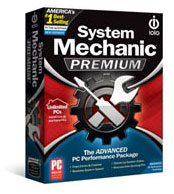
Only System Mechanic 11 optimizes your entire PC

BONUS: Includes Whole Home License® for use on all your home PCs*

The System Mechanic Premium difference:

  • Boosts speed using 12 unique acceleration methods
  • Repairs over 30,000 different problems and errors
  • Maintains your PC automatically using patented
    ActiveCare® technology
  • Search and Recover® – recover accidentally deleted
    files, photos and more
  • DriveScrubber® – securely erase data from your hard drive

Join the millions who have relied on iolo’s best-in-class PC performance solutions.

#1 Best-selling PC tune-up software since 1998 #1 Best-selling PC tune-up
software since 1998
Over 75 million PCs repaired Over 80 million PCs repaired
For Windows ® 8, 7, Vista and XP For Windows® 8, 7,
Vista and XP

Here’s how to redeem your FREE copy of System Mechanic Premium:

Step 1: Download

Get System Mechanic Premium

Install the file that was pre-loaded onto your Lexar® JumpDrive® or click Start Download

Step 2: Install

Begin installation

When the Installer starts, follow the step-by-step directions. In the next step you will be prompted to enter your Activation key.
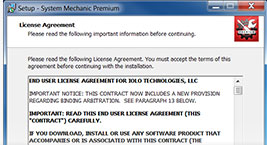
installation

Step 3: Activate

Enter Activation Key

  • Locate your Activation key on the back of the System Mechanic coupon that came in your package.
  • Type the Activation key and your email address into the License Information window.
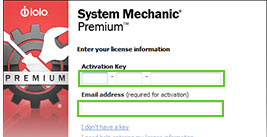
installation

Step 4: Complete

Complete Installation

  • Continue following the step-by-step instructions to complete the installation process.
  • When finished, you may need to restart your computer.
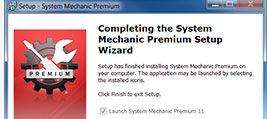
installation
*For details on Whole Home License® click here.

©1998-2015 iolo technologies, LLC. All rights reserved.

15 years of PC tune-up innovation


How to find System Mechanic installer file

From the browser window on your PC, press Ctrl + J and look for the file named smdm.exe. Then click the file name to open the installer.

Still can’t find it?

Open File Explorer on your PC and look in your Downloads folder for the smdm.exe file.

BONUS:

includes 15 tools and features
System Mechanic Ultimate Defense Product Logo

Performance

ActiveCare

Advanced cleaning and repair removes more unsafe
clutter and fixes more problems than ever before,
going to work whenever your PC is idle.

Internet Cleanup

Delete temporary internet files for better responsiveness

Windows Cleanup

Delete Windows junk files to unleash speed

Memory Mechanic

Free up memory for better performance

NetBooster

Optimize settings to speed up internet connections

Registry Cleanup

Find and repair registry files to improve performance

Security Optimizer

Detect and resolve Windows security issues

Program Accelerator

Detect and resolve Windows security issues

Toolbox

Startup Optimizer

Speed up Windows startup time

Network Scanner

View external devices and connections

File Incinerator

Remove and destroy deleted files

Advanced Uninstaller

Easily remove installed programs

Process Scanner

Find memory-intensive background tasks

Deceptive Programs

Find and remove harmful software

AppPrioritizer

Prioritize speed and efficiency for the apps you use most

What is iolo's Whole Home License?

The Whole Home License® is iolo’s licensing policy that allows you to install and keep your software running on all of your compatible devices within the same home. Previously, users were allowed to install and license their iolo software simultaneously on a maximum of three PCs. Under the Whole Home License, a single activation key allows you to use your iolo software on all of your PCs, other than any PCs you use for business purposes. What you need to know about Whole Home Licensing

  • You, your spouse, and your relatives living within the same household may use the same license on any number of PCs that you own which are not used for business.
  • For full legal terms and conditions, see https://www.iolo.com/company/legal/eula/

To install your iolo product on additional PCs:

  1. On the additional computer, download the latest version of your iolo product. Choose from the list of downloads offered here.
  2. Follow the steps in the installation wizard, and enter the same Activation Key that you used to install on your original computer.

You can view the Activation Key on the original computer from within System Mechanic > red menu bar > key icon > Activation Key.