System Mechanic® Ultimate Defense™ vs. Malwarebytes
One program delivers total PC performance, privacy, and protection. The other costs 43% more.
System Mechanic Ultimate Defense vs. Malwarebytes: Feature Comparison
See why PC Mag and TechRadar favor System Mechanic Ultimate Defense for the ultimate PC protection.
| System Mechanic Ultimate Defense | Malwarebytes | |
|---|---|---|
|
Annual price |
$49.99 year one, then $84.95 |
$119.99 |
|
Devices included |
Up to 10 |
Up to 10 |
|
Cost per device |
$4.99 |
$11.99 |
|
Platform support |
Purpose-built for PCs |
Windows, Mac, Mobile |
|
Real-time virus protection |
|
|
|
Malware prevention and removal |
|
|
|
Frees up memory |
|
|
|
Smart ActiveCare automated maintenance |
|
|
|
Password manager |
|
|
|
Performance optimization |
|
|
|
File recovery |
|
|
Why choose System Mechanic Ultimate Defense
Malware and Virus Protection
Real-time protection keeps your PC clear of virus and malware threats without sacrificing PC performance.
Performance Optimization
Smart ActiveCare automatically detects and repairs issues to improve speed and free up memory.
Password Management
Peace of mind for wherever you browse. Store and autofill passwords securely in one easy-to-manage browser extension.
File
Recovery
Get back accidentally deleted documents, music, photos, email, videos, and system files before they're gone for good.
Try it risk-free for 30 days
Step 1
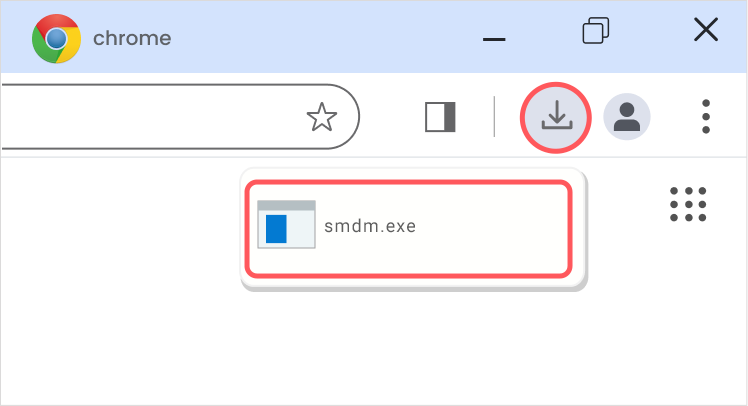
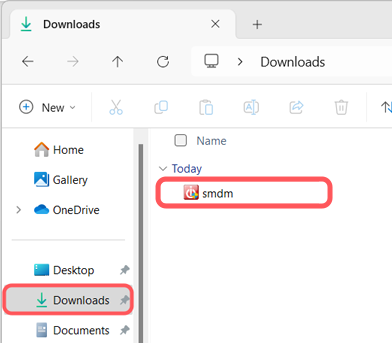
Download and install
Step 2
Run your first scan
Step 3
Enable real-time protection
Step 4
Optimize your PC
Which one fits you best?
| Choose System Mechanic Ultimate Defense if... | Choose Malwarebytes if... |
|---|---|
|
You want protection purpose-built for PCs |
You need cross-platform security |
|
You prioritize automated maintenance, optimization, and password security |
You only care about viruses and malware |
|
You want protection purpose-built for PCs |
You don’t need to speed up your PC, free up memory, or prevent freezes |
|
You want the best value for a low price |
You’re not worried about forgetting passwords or accidentally deleting files |
|
You want to pay $49.99 annually for 10 devices |
You want to pay $119.99 annually for 10 devices |
Try System Mechanic Ultimate Defense risk-free for 30 days and start enjoying these features and benefits
- Smart ActiveCare maintenance
- DeepClean optimization
- Startup speed boost
- ByePass password manager
- Malware Killer protection
- Real-time security scans
- Digital fingerprinting shield
- Privacy Guardian
- Browser extensions
- 24/7 customer support
- LiveTech 30-day trial
- For use on up to 10 devices